
Course
For teaching: units and a learning path, tests, assignments and grades, with an AI coach where it helps.

Features
An activity space starts simple. You add services one by one: content, units, tests, forums, AI rooms, certificates. Learners see only what the space uses.
Not only courses
A space is set up for what the group is there to do. All three use the same services and the same members, roles and sign-in.
For teaching: units and a learning path, tests, assignments and grades, with an AI coach where it helps.

For a team that works together: shared files with their history, forums and meetings, workspaces with deliverables and a work plan.

For material that is kept and shared: digital content in categories, presentations and search, without the rhythm of a course.
Organise the material once and give every learner a clear way through it.
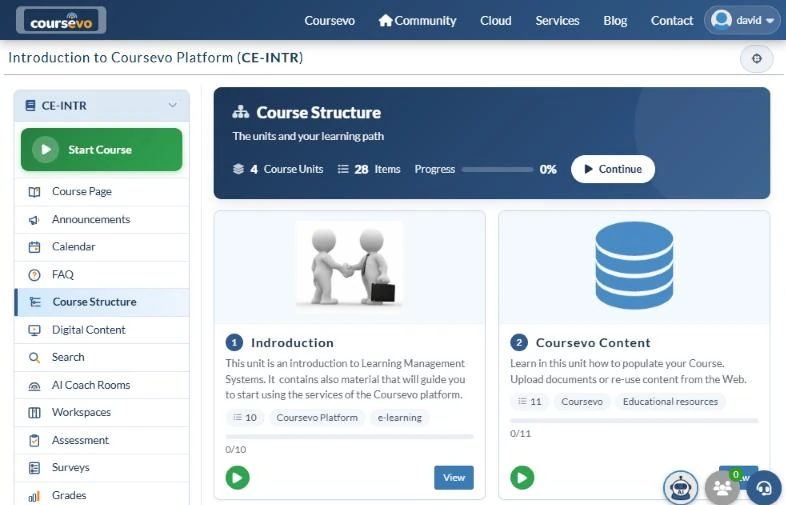
A course lives in an activity space. Each period gets its own run, so earlier groups and their work stay as they were.
Put files, pages, videos, tests and AI rooms together in units, with one level of subunits where a topic needs it.
Set the order of the units and what counts as completing each one. Learners see how far they have come.
A focused view that takes the learner through a unit step by step, with your notes between the steps. It has a full-screen mode and works on a phone.
In a course for instructors, each trainee can get a personal copy of a ready-made space and practise there as its instructor.
Copy a whole space into a new one for the next period, or have its material translated into another language with AI.

The teaching material of a space, kept in order and easy to open.
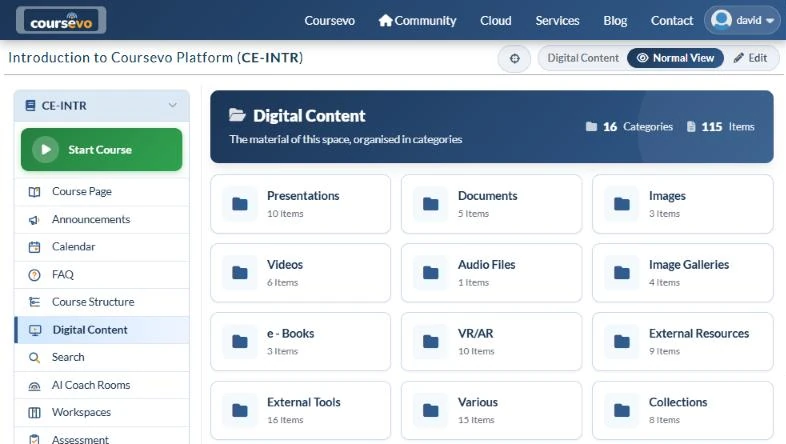
Files, links, HTML pages and video in folders. Version history can be kept per category.
PDF and Office files become page-by-page presentations that open in the browser, with nothing to download.
Write HTML pages in a visual editor, with one look for headings across the space and an AI writing assistant.
Formulas written in LaTeX are shown properly in pages and in tests.
Give a short link to a file or page, and search the material of a space.
Export the material of a space as a SCORM package for use elsewhere.

From a quick poll in class to a graded test.
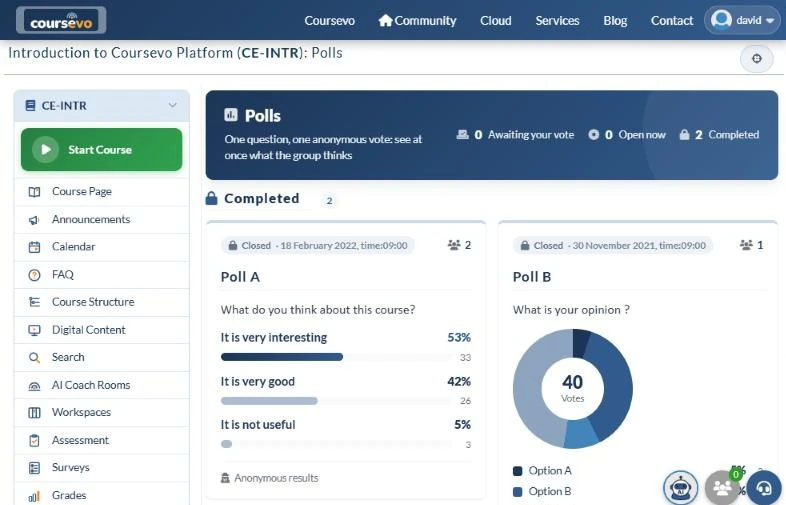
Graded tests, practice quizzes and questionnaires are built from one question bank per space.
Bring questions in from GIFT files and take them out again. AI can draft questions for you to review.
In practice quizzes an AI coach explains the question and leads the learner to the answer. It gives feedback, not a grade.
Ask the room a question and show a QR code. Guests vote from their phones without an account.
Learners hand in their work online and the staff of the space collect it in one place.
Keep the grades of exams, labs and assignments for the space.

Workspaces give each team, or each learner, a place for one piece of work: what to hand in, by when, and how they get there.
One workspace per assignment, laboratory or set of exercises, for individual work or for teams of a size you set.
You form the teams or learners register their own until a deadline, and you accept them. Each team gets a mailing list.
Choose what every team has for itself: a forum, a chat, a video meeting room and its own shared files.
Say what must be handed in, when uploading opens and closes, and how long after the deadline it is still accepted.
See what each team uploaded, marked on time or late, with its comments. Grade it there and the grade goes to the gradebook.
A Gantt chart with tasks and milestones, their progress and priority, assigned to teams or to single learners.

Ways for the members of a space to talk and meet.
Discussions per space. If you turn it on, the AI Coursevo Mentor replies to topics, clearly marked as AI.
See who is online and talk in real time.
Post announcements, keep a calendar for the space and send e-mail to its members.
Video classrooms and meeting rooms with BigBlueButton, opened from the space.
A page of the space's community: who is a member, who is online, a ranking of activity and the badges earned.
Members ask for help from inside the platform and the staff answer from one list.

Show what a learner achieved in a form others can check.
PDF certificates made from your own template, each with its own code.
A QR code on the certificate opens a page that confirms the award is real.
Badges that learners can take with them. They pass the 1EdTech Open Badges validator.
Design certificates and badges visually. The image of a badge can be drawn with AI.
Award by hand, or let the platform award when the criteria are met.
Give a certificate for a whole programme, for example for completing any four of its six courses.

One platform, many organisations, each with its own site.
Your own address, logo, welcome page and site documents.
Group courses into programmes, describe them publicly and open new runs for each period.
Manage the members of the site, their roles and the staff of each space.
The interface is available in 17 languages. A translation editor lets you correct or complete the texts.
See how spaces are used and who connected when.
Choose the AI provider and models for your site and set usage limits.
The AI features have a page of their own.
Create a space, add your material and open it to your learners. Nothing to install.