Artifact Generator
Drafts lesson plans, pages, quizzes and other material from your sources. You review everything before learners see it.
For instructors

Artificial intelligence
On Coursevo the AI has specific jobs. It explains, asks questions, gives feedback and drafts material. Grades and decisions stay with the instructors and the rules of the space.
AI Coach rooms
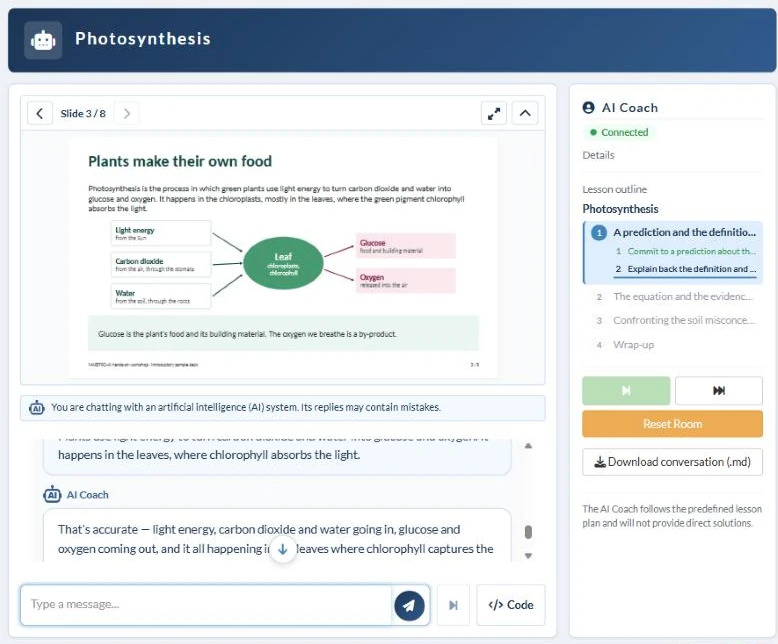
An AI Coach room is a guided session. The instructor writes the lesson plan and the coach takes each learner through it at the learner's own pace.
Beyond the rooms
Each feature is turned on per space by its instructor.
Drafts lesson plans, pages, quizzes and other material from your sources. You review everything before learners see it.
For instructors
A library of ready teaching patterns to build a lesson plan from, so you do not start from an empty page.
For instructors
Explains questions in practice quizzes and comments on answers. Feedback, not a grade.
For learners
Replies to forum topics when the instructor has turned it on. Each reply says it comes from an AI.
For the members of a space
Answers questions about using the platform and about the material of the space you are in.
For everyone
Translates the material of a whole space into another language, including the text inside images if you ask.
For instructors
Control
Six things make the AI on Coursevo something an instructor can answer for.
Before each answer the platform finds the matching passages in the lesson plan and the room's material and gives them to the model.
When you allow it, each answer carries numbered references. A click opens the passage, marked inside the page it comes from.
For each room and learner you see the result per activity and the coach's decision at every step. Learners appear by code, not by name.
Google Gemini, Anthropic Claude or OpenAI, chosen for the site, the space or a single room.
Each organisation sets how much AI its spaces and users may use.
Every AI reply is marked as AI on screen, and what the AI produces carries a machine-readable mark.
Create a space, add your material and open it to your learners. Nothing to install.